Session: Fredag 14/12-07 kl. 9-12
Deltagere: elvar, eof, hsa
Sessionens formål:
1. Finde det endelige First Lego League projekt vi vil arbejde med.
2. Formulere en endelig projektbeskrivelse.
3. Bygge de modeller der skal bruges til banen og færdiggøre opsætning.
1. Valg af projekt
Efter en samtale med vores vejleder (Ole Caprani) fandt vi frem til, at First Lego League projektet fra 2003 - Mission Mars - umiddelbart havde de mest interessante aspekter i forhold til et projekt. Der er god mulighed for at undersøge reaktive opførselsmønstre i dette projekt, da der er en del navigering og en god ruteopdeling via breddegrads opdelingen på "spillemåtten", som ses herunder.
TODO: Insert pic of mars mat.
2. Endelig projektbeskrivelse
Da vi desværre ikke kunne nå at bygge alle de modeller der kræves til projektes opsætning har vi ikke kunne formalisere vores beskrivelse endnu. Dette bliver gjort næste gang vi mødes, som 1. prioritet.
3. Opsætning af spillemåtte
Som det ses på det ovenstående billede er vi næsten færdige med opsætning af vores bane. Der var dog flere modeller der skulle bygges end forventet, så det har taget længere tid end vi regnede med.
Færdiggørelsen af opsætning vil ske næste gang vi mødes.
Bemmærk til fremtid reference at spillemåtten og alle dens komponenter, samt de opgaver der skal løses, kan findes her.
Næste møde:
Pga. jul og nytår, bliver næste møde i første uge af januar.
fredag den 14. december 2007

fredag den 30. november 2007
The future of the Borg
Today the group members (Elvar, Ebbe and Henrik) met up in Suze at 9.00. Today we are supposed to discuss and decide our end course project.
We looked at the list of possible projects and all the ones with communications between robots did not interest us. However the project from last year's First Lego League did interest us. In that project the robot has to navigate between different points and perform various missions at these points. The most difficult problem in this project is getting the robot to learn the various locations on the map and navigate to them. A standard robot will be sufficient to complete this project, meaning all the standard actuators and sensors included in the Lego kit. A link to a more detailed description of the project is included here
We will be using Behaviour based architecture to perform the missions with one behaviour for each action that the robot does.
In the end we should able to present a robot that successfully finishes all the missions and can navigate to all locations on the map.
We plan on looking at the description in more depth and design our software architecture. After that we build the Borg and code the implementation. Finally we test our Borg on the actual map. We will first start on the project on the friday the 7th.
We will be using Behaviour based architecture to perform the missions with one behaviour for each action that the robot does.
In the end we should able to present a robot that successfully finishes all the missions and can navigate to all locations on the map.
We plan on looking at the description in more depth and design our software architecture. After that we build the Borg and code the implementation. Finally we test our Borg on the actual map. We will first start on the project on the friday the 7th.
fredag den 23. november 2007
Lesson 10:
Idag 23/11-2007 mødtes vi alle i gruppe, Elvar, Henrik og Ebbe fra kl 9:00-12:00
Indledning:
Idag skal vi, igennem en række forsøg, undersøge hvordan en behaviour-based architecture er blevet implementeret med subsumption API'et leJOS NXJ.
BumperCar:
Vi skal her eksperimentere med et behaviour-based system, hvor en legobil med en touch sensor kører udgør kernen i eksperimentet. Legobilen indeholder to behaviours som hver især aktiveres på bestemte stimuli. De to behaviour er DriveForward og HitWall.
I første del eksperiment skal vi beskrive hvad der sker når vi trykker touch sensoren ned og holder den nede. Vi observerede at så snart touch sensoren trykkes ned, så begynder legobilen at bakke, indtil den til sidst helt stopper. Det der sker internt i legobilen er at når touch sensoren aktiveres så starter den HitWall, som så er aktiveret et vidst antal sekunder, hvorefter den så stopper. HitWall han derefter aktiveres igen ved at slippe touch sensoren, for så derefter at trykke på den igen, men den aktiveres ikke sekventielt ved at holde touch sensoren nede. Det vil sige at takeControl metoden i DriveForward ikke bliver aktiveret så længe at HitWall er aktiveret da DriveForward er i sleep-mode så længe HitWall er aktiv.
Efter at vi havde implementeret en PlaySound behaviour og givet den højest prioritet skulle vi derefter observere HitWall og se hvordan den ville reagere når den blev suppressed. Når HitWall bliver suppressed stopper begge motorere, men det kan alligevel godt ske at HitWall stadig har kontrol over motorene da programmet HitWall sover mellem at den kørere tilbage og drever legobilen og hvis tråden sover kan den ikke umiddelbart suppresses, så derfor kan HitWall godt stadig have kontrol over bilen selvom den bliver suppressed.
Another Arbitrator:
Her skal vi undersøge hvorledes vi kan undersøge en triggering condition ved mellem et konstant interval. Hvis vi kort kigger tilbage på den forrige opgave, hvor vi skulle se hvad der skete når når touch sensoren holdes nede, så observerede vi at der ikke skete noget efter den havde reageret første gang. Det ville være smart hvis legobilen reagerede på at touch sensoren blev holdt ned ved at den blev ved med at køre baglæns, og dette vil måske være muligt med undersøgelse at triggering conditions mellem et fast interval.
Efter vi tog de beskrevne skridt i opgaven opserverede vi nu at, hvis f.eks touch sensoren blev holdt nede, så gentog den HitWall behaviour sekvensen flere gange efter hinanden, som vi havde antaget.
Motivation Funktions:
Denne opgave går ud på at bruge motivation som faktor i beslutnings processen, når legobilen finder ud af hvilken behaviour den skal udføre. Her kan takeControl eventuelt bruges hvor den returnere en motivation variable mellem 0-1, som hentyder hvor motiveret legobilen er for at udføre en bestemt behaviour, hvor 1 er max motiveret. HitWall kunne sættes til at bruge denne metode sådan at når legobilen rammer en mur, så er den max motiveret til at bakke tilbage og dreje væk fra muren. Bilen ville derimod være mindre motiveret til at gentage sekvensen når den drejer da det ikke er mulig at køre ind i noget forfra når man bakker. Legobilen kunne derimod godt ramme en forhinding når den drejer i den dens forsøg på at komme væk fra muren, så her skulle den så igen være max motiveret til at undvige væggen endnu engang. Dermed kunne HitWall aktiveres når den forsøger at dreje væk fra muren.
References:
ReferencesBrian Bagnall, The leJOS Tutorial, Behavior
Thiemo Krink (in prep.). Motivation Networks - A Biological Model for Autonomous Agent Control.
Indledning:
Idag skal vi, igennem en række forsøg, undersøge hvordan en behaviour-based architecture er blevet implementeret med subsumption API'et leJOS NXJ.
BumperCar:
Vi skal her eksperimentere med et behaviour-based system, hvor en legobil med en touch sensor kører udgør kernen i eksperimentet. Legobilen indeholder to behaviours som hver især aktiveres på bestemte stimuli. De to behaviour er DriveForward og HitWall.
I første del eksperiment skal vi beskrive hvad der sker når vi trykker touch sensoren ned og holder den nede. Vi observerede at så snart touch sensoren trykkes ned, så begynder legobilen at bakke, indtil den til sidst helt stopper. Det der sker internt i legobilen er at når touch sensoren aktiveres så starter den HitWall, som så er aktiveret et vidst antal sekunder, hvorefter den så stopper. HitWall han derefter aktiveres igen ved at slippe touch sensoren, for så derefter at trykke på den igen, men den aktiveres ikke sekventielt ved at holde touch sensoren nede. Det vil sige at takeControl metoden i DriveForward ikke bliver aktiveret så længe at HitWall er aktiveret da DriveForward er i sleep-mode så længe HitWall er aktiv.
Efter at vi havde implementeret en PlaySound behaviour og givet den højest prioritet skulle vi derefter observere HitWall og se hvordan den ville reagere når den blev suppressed. Når HitWall bliver suppressed stopper begge motorere, men det kan alligevel godt ske at HitWall stadig har kontrol over motorene da programmet HitWall sover mellem at den kørere tilbage og drever legobilen og hvis tråden sover kan den ikke umiddelbart suppresses, så derfor kan HitWall godt stadig have kontrol over bilen selvom den bliver suppressed.
Another Arbitrator:
Her skal vi undersøge hvorledes vi kan undersøge en triggering condition ved mellem et konstant interval. Hvis vi kort kigger tilbage på den forrige opgave, hvor vi skulle se hvad der skete når når touch sensoren holdes nede, så observerede vi at der ikke skete noget efter den havde reageret første gang. Det ville være smart hvis legobilen reagerede på at touch sensoren blev holdt ned ved at den blev ved med at køre baglæns, og dette vil måske være muligt med undersøgelse at triggering conditions mellem et fast interval.
Efter vi tog de beskrevne skridt i opgaven opserverede vi nu at, hvis f.eks touch sensoren blev holdt nede, så gentog den HitWall behaviour sekvensen flere gange efter hinanden, som vi havde antaget.
Motivation Funktions:
Denne opgave går ud på at bruge motivation som faktor i beslutnings processen, når legobilen finder ud af hvilken behaviour den skal udføre. Her kan takeControl eventuelt bruges hvor den returnere en motivation variable mellem 0-1, som hentyder hvor motiveret legobilen er for at udføre en bestemt behaviour, hvor 1 er max motiveret. HitWall kunne sættes til at bruge denne metode sådan at når legobilen rammer en mur, så er den max motiveret til at bakke tilbage og dreje væk fra muren. Bilen ville derimod være mindre motiveret til at gentage sekvensen når den drejer da det ikke er mulig at køre ind i noget forfra når man bakker. Legobilen kunne derimod godt ramme en forhinding når den drejer i den dens forsøg på at komme væk fra muren, så her skulle den så igen være max motiveret til at undvige væggen endnu engang. Dermed kunne HitWall aktiveres når den forsøger at dreje væk fra muren.
References:
ReferencesBrian Bagnall, The leJOS Tutorial, Behavior
Thiemo Krink (in prep.). Motivation Networks - A Biological Model for Autonomous Agent Control.
fredag den 16. november 2007
Lesson 9: The living GPS Borg.
The goal is to perform some experiments with the tacho navigator in order to explore the accuracy and potential uses.
The codebase in this experiment and the ideas and inspiration for this lesson comes from chapter 12 of the book: "Maximum Lego NXTBuilding Robots with Java Brains" by Brian Bagnall.
The robot used for this experiment is similar to the one seen on the exercise page. In fact we just used our "default" Lego robot, with some minute changes. The main one of these being, that we changed which end of the robot was 'forward' so that the turn wheel in the center is now the front of the robot.
Experiment 1:
The goal of this experiment is to determine the accuracy of the tacho navigator. We will be driving the route displayed on page 298 in chapter 12 of Bagnall's book 5 times. Each time measuring how far from the starting point the robot stops. (closer is of course better). This will give us an initial idea of the accuracy of this form of navigation.
 The dark coin is the starting point and the light coin is the point were it stopped.
These are our initial results:
Run no. Deviation from start point - Direction from start point to endpoint
1: 11,5cm - W
2: 6,8cm - W
3: 10,0cm - SW
4: 7,3cm - W
5 8,7cm - NW
Thought experiment:
The last problem we will consider in todays lessons, is how it would be possible to make the robot move from one place to another using the TachoNavigator class, while avoiding any obstacles on the way.
The general problem in doing this, is keeping the TachoNavigator up-to-date with the current position while avoiding obstacles. One way to do this was to implement behaviors as we have seen last time. Having a "move to point" behavior, that utilizes the TachoNavigator running as the default behavior, but either
a) stopping every X units to detect any obstacles in its way and then starting the "avoid" behavior, or
b) having the avoidance behavior being able to inhibit the "move to point" behavior, while it avoids an obstacle.
option b) would probably be preferred, as it makes more sense to talk about "behaving" in some manner in this way.
The main thing here is then that the avoidance behavior should take over, but not just avoid randomly. It could be a "wall follower" behavior that tries to follow the obstacle outline in the general direction of the point we want to go to. The last part of this sentence is important, since we do not want the robot to be sidetracked to a dead end, or an entirely different location. So it should always try to have some "desired" direction that goes toward the final point it wants to reach. After avoiding the obstacle (in one way or another), the UpdatePosition method should be called in the TachoNavigator class, and the "move to point" behavior should take over again.
The code used in this experiment can be found here.
The codebase in this experiment and the ideas and inspiration for this lesson comes from chapter 12 of the book: "Maximum Lego NXTBuilding Robots with Java Brains" by Brian Bagnall.
The robot used for this experiment is similar to the one seen on the exercise page. In fact we just used our "default" Lego robot, with some minute changes. The main one of these being, that we changed which end of the robot was 'forward' so that the turn wheel in the center is now the front of the robot.
Experiment 1:
The goal of this experiment is to determine the accuracy of the tacho navigator. We will be driving the route displayed on page 298 in chapter 12 of Bagnall's book 5 times. Each time measuring how far from the starting point the robot stops. (closer is of course better). This will give us an initial idea of the accuracy of this form of navigation.
 The dark coin is the starting point and the light coin is the point were it stopped.
These are our initial results:
Run no. Deviation from start point - Direction from start point to endpoint
1: 11,5cm - W
2: 6,8cm - W
3: 10,0cm - SW
4: 7,3cm - W
5 8,7cm - NW
We observe, that the deviation is somewhat 'stable' in that it always ends behind the starting point (west of it). What this tells us is, that the accuracy of our own measurements on wheelbase might be off a bit, but also that the robot can not be considered 100% accurate in this form of navigation. Things like 'slippage' of the wheels and the inaccuracy of the mechanics that is Lego, plays a big part when driving a robot like this. For example, if the Borg drove over a coin then that was sometimes enough to introduce errors in the angles of the Borg. And once an angle error has been introduced into the driving then there is no way to take it back. At least not in the code we are using.
One thing we noticed when writing the code to test turn behavior is that when we wanted the Borg to rotate 360 degrees then nothing happened. It might be that the compiler optimizes that away since that is basically the same as doing nothing, we are not sure. We did manage to force it to turn by making a for loop that rotates the Borg 90 degrees 4 times. Even then did it not end up facing the same direction as it started in.
One thing we noticed when writing the code to test turn behavior is that when we wanted the Borg to rotate 360 degrees then nothing happened. It might be that the compiler optimizes that away since that is basically the same as doing nothing, we are not sure. We did manage to force it to turn by making a for loop that rotates the Borg 90 degrees 4 times. Even then did it not end up facing the same direction as it started in.
As a follow up to this experiment we observed that changing the wheel base to be more robust (e.g. we locked the wheels in place to be sure that they did not vary at all in between experiments) produced more stable results and therefore more accurate made the Borg get closer still to the starting point. However, the exact stopping point still varied between each run in a similar matter as before.
Thought experiment:
The last problem we will consider in todays lessons, is how it would be possible to make the robot move from one place to another using the TachoNavigator class, while avoiding any obstacles on the way.
The general problem in doing this, is keeping the TachoNavigator up-to-date with the current position while avoiding obstacles. One way to do this was to implement behaviors as we have seen last time. Having a "move to point" behavior, that utilizes the TachoNavigator running as the default behavior, but either
a) stopping every X units to detect any obstacles in its way and then starting the "avoid" behavior, or
b) having the avoidance behavior being able to inhibit the "move to point" behavior, while it avoids an obstacle.
option b) would probably be preferred, as it makes more sense to talk about "behaving" in some manner in this way.
The main thing here is then that the avoidance behavior should take over, but not just avoid randomly. It could be a "wall follower" behavior that tries to follow the obstacle outline in the general direction of the point we want to go to. The last part of this sentence is important, since we do not want the robot to be sidetracked to a dead end, or an entirely different location. So it should always try to have some "desired" direction that goes toward the final point it wants to reach. After avoiding the obstacle (in one way or another), the UpdatePosition method should be called in the TachoNavigator class, and the "move to point" behavior should take over again.
The code used in this experiment can be found here.
torsdag den 8. november 2007
Lesson 8: The structured Borg!
For lesson 8 we all met in Zuse from 12-15.
The main goal for today is to do the exercises described in lesson 8. The purpose of this lesson, is to examine layered control systems as described by Rodney Brooks in e.g. his MIT AI Memo 864. The main idea is to build specific behavior for the robot in different modules, which will be combined and run concurrently in order to achieve some overall behavior. In this manner the sample code provides us with 3 modules: Avoid front, random drive and play sounds.
During this lesson we will extend the program with a new module "Go towards light" which we will run together with the other modules. By adding more modules, the robot will (hopefully) exhibit a more complex behavior, or seem to have more goals it wishes to achieve.
But first things first:
Experiment 1 - Observing a Borg's behavior
In this experiment we will run the BehaviourTest1.java program (support classes found here) in order to observe the behavior. The goal is to learn how the modules running in different threads affect the overall behavior of the Borg.
After observing the robot, it is clear that the behavior varies between the 3 modules. But, as expected the "Play sound" module inhibits both the other modules, such that when playing sounds, it will stand still.
In the same manner the "Avoid front" module inhibits the "random drive", such that it will take over when close to an obstacle, and try to steer away from it.
Reflecting on this it is clear that when writing our own module, we must have some sort of inhibiting mechanism, such that the robot does not always just drive towards the light. Specifically it will probably be clever to have the "Avoid Front" module inhibit our module, so that it is able to avoid obstacles, even though they are bright and shiny.
In a similar manner it will be hard to both drive randomly, while still being attracted to light, so we will have to strike a balance as to which module gets command.
Experiment 2 - Teaching the Borg some manners of light
This experiment includes the coding of our module(s) which will exhibit behavior such that the robot will drive towards light. Last week we built a similar module, so it is mostly a matter of incorporating it into the framework. Our code can be found here.
The first attempt was more successful than we could have hoped. It actually followed light, while still playing sounds and occasionally taking a peek around the floor (meaning driving random every 1-3 seconds).
Instead of actually suppressing the randomdrive module, we just made that module only activate from time to time in order to get a small random deviation, in our quest for light sources.
It should be mentioned that we implemented the "drive towards light" in two different threads as suggested from last lessons exercises.
Our main problem after the first run, was that the "suppress" mechanism did not work. Meaning that when it hit a wall, it kept on going forward. This came down to a bug in the way we used the motors, as we had used motor instances instead of motorports, meaning we avoided the locomotion entirely, overruling the suppressing mechanisms somehow. We were able to fix this rather easily and the successive runs were actually surprisingly good.
In conclusion we were surprised to see that this simple form of layered concurrent behavior model was actually able to get some "fun" but still goal oriented behavior from the robot. It would probably be possible to implement more modules and string them together with the existing ones to make the robot e.g. want to follow lines, or play sounds when driving over specific colors.
That being said it will quickly become hard to manage the suppressing mechanisms, and getting more than 5-7 modules running concurrently will be a technical nightmare in forms of what should run when, and trying to determine the main goals that the robot will aim to please at any given time.
The main goal for today is to do the exercises described in lesson 8. The purpose of this lesson, is to examine layered control systems as described by Rodney Brooks in e.g. his MIT AI Memo 864. The main idea is to build specific behavior for the robot in different modules, which will be combined and run concurrently in order to achieve some overall behavior. In this manner the sample code provides us with 3 modules: Avoid front, random drive and play sounds.
During this lesson we will extend the program with a new module "Go towards light" which we will run together with the other modules. By adding more modules, the robot will (hopefully) exhibit a more complex behavior, or seem to have more goals it wishes to achieve.
But first things first:
Experiment 1 - Observing a Borg's behavior
In this experiment we will run the BehaviourTest1.java program (support classes found here) in order to observe the behavior. The goal is to learn how the modules running in different threads affect the overall behavior of the Borg.
After observing the robot, it is clear that the behavior varies between the 3 modules. But, as expected the "Play sound" module inhibits both the other modules, such that when playing sounds, it will stand still.
In the same manner the "Avoid front" module inhibits the "random drive", such that it will take over when close to an obstacle, and try to steer away from it.
Reflecting on this it is clear that when writing our own module, we must have some sort of inhibiting mechanism, such that the robot does not always just drive towards the light. Specifically it will probably be clever to have the "Avoid Front" module inhibit our module, so that it is able to avoid obstacles, even though they are bright and shiny.
In a similar manner it will be hard to both drive randomly, while still being attracted to light, so we will have to strike a balance as to which module gets command.
Experiment 2 - Teaching the Borg some manners of light
This experiment includes the coding of our module(s) which will exhibit behavior such that the robot will drive towards light. Last week we built a similar module, so it is mostly a matter of incorporating it into the framework. Our code can be found here.
The first attempt was more successful than we could have hoped. It actually followed light, while still playing sounds and occasionally taking a peek around the floor (meaning driving random every 1-3 seconds).
Instead of actually suppressing the randomdrive module, we just made that module only activate from time to time in order to get a small random deviation, in our quest for light sources.
It should be mentioned that we implemented the "drive towards light" in two different threads as suggested from last lessons exercises.
Our main problem after the first run, was that the "suppress" mechanism did not work. Meaning that when it hit a wall, it kept on going forward. This came down to a bug in the way we used the motors, as we had used motor instances instead of motorports, meaning we avoided the locomotion entirely, overruling the suppressing mechanisms somehow. We were able to fix this rather easily and the successive runs were actually surprisingly good.
In conclusion we were surprised to see that this simple form of layered concurrent behavior model was actually able to get some "fun" but still goal oriented behavior from the robot. It would probably be possible to implement more modules and string them together with the existing ones to make the robot e.g. want to follow lines, or play sounds when driving over specific colors.
That being said it will quickly become hard to manage the suppressing mechanisms, and getting more than 5-7 modules running concurrently will be a technical nightmare in forms of what should run when, and trying to determine the main goals that the robot will aim to please at any given time.
tirsdag den 6. november 2007
Light! The Borgs first love and worst enemy
In lesson 7 we have to study some examples vehicles proposed by Valentino Braitenberg in the early 1980's. Braitenburg proposed several reactive vehicles that have seemingly complex behaviours although they only consist of very simple internal structures.
Our primary interest in this lesson will be 2 vehicles, which react to light. Specificly, one will seemingly appreciate any lightsource, and try to drive closer to it, while the other will "fear" the light and drive away from it.
Theese behaviours will be accomplished by having two lightsensors at the front of our bot, that are "directly coupled" to the two motors, such that when the lightsensor experiences an increased amount of light, it will generate more power for its corresponding motor.
The trick is, that in order to get the "attraction" effect, we will crosswire the sensor and motor, such that when the right sensor senses light, it will increase the power to the left motor, hence making it go right. To Achieve the opposite effect, we will just switch the sensor/motor connection. This is a very simple matter, even though one has to remember that the input from the sensors actually has to go through our program which wil interpret the value, normalize and adapt it before the power to the motor will be set. Hence it is kind of a simulation of Braitenburg's intended vehicles.
Based on code based on the simple examples in the article from lesson 7, we build our Borg as explained. But even though it is a simple system it was not quite such an easy matter to get it to work.
One of the major problems was that the sensors reacts very poorly on light from the environment and hence it was hard to get it to do anything at all. Another problem we encountered was with the multithreading capabilities of the java framework for lego. It was not easy to actually get both sensors and motors to react in a concurrent fashion.
Theese problems resulted in the fact that we had to actually point a lightsource at one of the light sensors to get it to do anything. A lightsource on the top of the vehicle simple did not do anything for the sensors.
All this goes to show, that even though you are actually building something fundementally very simple, there are still lots of technical issues that inhibits the expected behaviour. We believe that if we had used the never NXT sensors instead of the old sensor versions we could have obtained some better results, but unfortunately theese where not available.
Our primary interest in this lesson will be 2 vehicles, which react to light. Specificly, one will seemingly appreciate any lightsource, and try to drive closer to it, while the other will "fear" the light and drive away from it.
Theese behaviours will be accomplished by having two lightsensors at the front of our bot, that are "directly coupled" to the two motors, such that when the lightsensor experiences an increased amount of light, it will generate more power for its corresponding motor.
The trick is, that in order to get the "attraction" effect, we will crosswire the sensor and motor, such that when the right sensor senses light, it will increase the power to the left motor, hence making it go right. To Achieve the opposite effect, we will just switch the sensor/motor connection. This is a very simple matter, even though one has to remember that the input from the sensors actually has to go through our program which wil interpret the value, normalize and adapt it before the power to the motor will be set. Hence it is kind of a simulation of Braitenburg's intended vehicles.
Based on code based on the simple examples in the article from lesson 7, we build our Borg as explained. But even though it is a simple system it was not quite such an easy matter to get it to work.
One of the major problems was that the sensors reacts very poorly on light from the environment and hence it was hard to get it to do anything at all. Another problem we encountered was with the multithreading capabilities of the java framework for lego. It was not easy to actually get both sensors and motors to react in a concurrent fashion.
Theese problems resulted in the fact that we had to actually point a lightsource at one of the light sensors to get it to do anything. A lightsource on the top of the vehicle simple did not do anything for the sensors.
All this goes to show, that even though you are actually building something fundementally very simple, there are still lots of technical issues that inhibits the expected behaviour. We believe that if we had used the never NXT sensors instead of the old sensor versions we could have obtained some better results, but unfortunately theese where not available.
søndag den 14. oktober 2007
Update on the balancing Borg
Using normal batteries instead of the rechargeable battery seemed to produce better results when using Brian´s design and code. The Borg managed to stay upright for at least 15 seconds which is a lot better then our previous time of around 5 seconds. It seems when it starts to loose balance by a large number of degrees it will try compensate with two much power and then it usually ends up either resting on the light sensor or falling forward on its face. This just goes to show that when writing code for a balancing Borg is a very precise matter and takes a lot of time in tweaking the values to get the balance correct. But now no more work will be done on the balancing Borg. The Borg looks forwards to new adventures after the autumn break.
torsdag den 11. oktober 2007
The Borg can balance
Today we had to make the Borg balance on two wheels like a segway. We used Brian Bagnall´s example as inspiration, but since our robot was constructed differently, we needed to modify the code so that it could balance as well. Since the Borg was taller it meant that we had to speed up more when it was losing balance. We tried our design on different surfaces, like paper, carpet, table etc, and we found that it couldn't quite balance it right, so we tried to change the speed values a bit, but we still couldn't quite make it work. Our design looked like this:
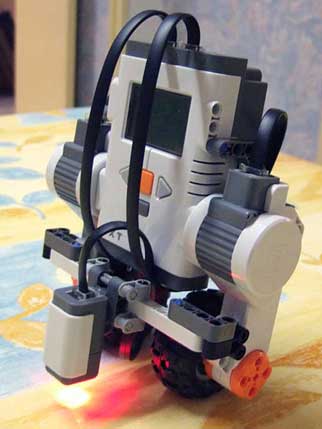
We couldn't get the values quite right, so we tried to change the design to that of Brian Bagnall. His design can be found in chapter 11 of a book called "Maximum Lego NXT: Building Robots with Java Brains".
After we changed the design we found that in order to make it balance, we had to tilt it backwards a little bit. The reason for this is because the we are using the rechargeable battery while Brian was using normal batteries. The rechargeable battery extends out one lego row more then when using normal batteries. This meant that the sensor had to be placed further out then in Brian´s design. It might also be that the rechargeable battery is heavier then normal batteries. We did not check that out.
After intensive tweaking we ended up with a borg that still could not hold its balance completely - although it could wobble for 5 seconds or so before going crazy. In the end it drove off the table and ended up comitting horrible suicide in this manner. It shattered into pieces and we decided to call it a day.
We couldn't get the values quite right, so we tried to change the design to that of Brian Bagnall. His design can be found in chapter 11 of a book called "Maximum Lego NXT: Building Robots with Java Brains".
After we changed the design we found that in order to make it balance, we had to tilt it backwards a little bit. The reason for this is because the we are using the rechargeable battery while Brian was using normal batteries. The rechargeable battery extends out one lego row more then when using normal batteries. This meant that the sensor had to be placed further out then in Brian´s design. It might also be that the rechargeable battery is heavier then normal batteries. We did not check that out.
After intensive tweaking we ended up with a borg that still could not hold its balance completely - although it could wobble for 5 seconds or so before going crazy. In the end it drove off the table and ended up comitting horrible suicide in this manner. It shattered into pieces and we decided to call it a day.
søndag den 7. oktober 2007
The big Robot Race
On the 4th of October there was a big robot race. The idea was that the borg should follow a black line and then stop in the green goal zone. We used the same construction from the day before when we were working on it. We arrived at the university at 9 clock and we started immediately tweaking the software of the borg. The problem was not that it did not run too fast, more that it went too fast in the curves so that it missed the black line. So we were trying to come up with a balance of speed in both straight lanes and in curves.
The best time we got was 39.45 seconds and we could not repeat that run after that since we tried to improve the software and then the borg started to behave funny. Sometimes it refused to turn at all or missed very easy turns. So that ended up being our best time in the track.
Unfortunately there is no video to document this run since we were not expecting our best run at that point. But the borg will return next week to perform more stunts.
The best time we got was 39.45 seconds and we could not repeat that run after that since we tried to improve the software and then the borg started to behave funny. Sometimes it refused to turn at all or missed very easy turns. So that ended up being our best time in the track.
Unfortunately there is no video to document this run since we were not expecting our best run at that point. But the borg will return next week to perform more stunts.
onsdag den 3. oktober 2007
First successful run of racetrack
Today we started working on the program of the borg. The Lego design of the borg was finished. The only thing we adjusted was the distance between the two RCX light sensors. We are not using the new NXT light sensor anymore since we only have one of them. Also the light values between the RCX sensor and the NXT are not the same and we thought that the RCX sensor gave better distinction between green and black then the NXT sensor. Therefore we decided to stick with two RCX sensors.
Our main idea is that the sensors should be placed in such a way that the black line is between the two sensors. So if both sensors read white values then it should drive straight ahead. If either sensor reads black values then the borg turns into that direction until it reads a white value. This is not a very complex design but it should work well in practice.
To begin with we just used the standard move methods from the Locomotion class. The borg finished the track in around 1.30 minutes. Then we tried our own version of the move methods. There we tweaked the values and we ended up with completing the track in just over 42 seconds. So that was a vast improvement compared to the original locomotion class. Our biggest problem was that the borg could overshoot the turns if it ran too fast. That is why we had to tweak the values for the move methods. We have also noticed a little peculiarity in the behavior of the borg. It does these sudden speed increases for no apparent reason and they only last for a very short time. This is not something we have included in our program so we cannot explain why this is happening. This can have a drastic effect on our borg, especially if it happens in turns. That means the borg will overshoot the turn and miss the black line.
Tomorrow is the final day to prepare the borg for the race. We can probably tweak the values a bit more to get a better time. But only time will tell :)
Our main idea is that the sensors should be placed in such a way that the black line is between the two sensors. So if both sensors read white values then it should drive straight ahead. If either sensor reads black values then the borg turns into that direction until it reads a white value. This is not a very complex design but it should work well in practice.
To begin with we just used the standard move methods from the Locomotion class. The borg finished the track in around 1.30 minutes. Then we tried our own version of the move methods. There we tweaked the values and we ended up with completing the track in just over 42 seconds. So that was a vast improvement compared to the original locomotion class. Our biggest problem was that the borg could overshoot the turns if it ran too fast. That is why we had to tweak the values for the move methods. We have also noticed a little peculiarity in the behavior of the borg. It does these sudden speed increases for no apparent reason and they only last for a very short time. This is not something we have included in our program so we cannot explain why this is happening. This can have a drastic effect on our borg, especially if it happens in turns. That means the borg will overshoot the turn and miss the black line.
Tomorrow is the final day to prepare the borg for the race. We can probably tweak the values a bit more to get a better time. But only time will tell :)
mandag den 1. oktober 2007
Extra Sensors

Today we made some changes to the borg. We added two RCX light sensors to it so that they are placed a little bit in front of the borg. We are hoping that this will enable us to detect changes in the track earlier and that way we do not have to take as sudden turns.
 We have not yet started working on the code to get this behaviour but that should happen very soon so that the borg will be ready for the race. We have also taken the big tires of the borg and put the smaller tires under it. This resulted in smoother turns but it did not go as fast but that problem can probably be fixed by putting more power into the motors.
lørdag den 29. september 2007
Modifications have begun!
We have now started rebuilding the car. Today the NXT unit was moved a bit backwards and now lies horizontal instead of the 45 degree angle it had before. The mount for the lightsensor has also been changed so that the lightsensor now points directly down at the surface and it is also alot closer to the surface then before. Work will continue at a later date.


torsdag den 27. september 2007
The war has begun
The goal with this weeks labsession is to get our Borg warrior through bootcamp, so that it will be ready for next weeks big race.
We will experiment with some prewritten color detection sensorprograms and try to get some insight into the simpler linefollower programs. We will then proceed to write a color detection program of our own, that is able to destinguish between black, white and green. We will then incorporate this into version 1 of our "race" program.
And the Borg said: "Let there be green"
..and he saw that it was good. Or at least better than monochrome vision.
Our initial experiments with the black and white sensor program was encouraging. The calibration feature is clever, since it allows the robot to function under various indirect lightsources without having to recode constant values. We did however stumble into a potential problem with the "ducktape" black color. It comes off as very light since it is very reflective of light. This means that the red light from the diode gets reflected instead of absorbed by the black color, hence making the values for white and black very close to each other. One thing that can be done about this is to turn the red light off, but this somewhat limits the functionality of the sensor in darker areas.
We will have to keep this in mind, and make a decision about what to do (or if it is even a crucial problem) once the race track is set up on friday.
After having played around with the black and white detector, we then wrote a ColorSensor program which could also see green, in addition to blackand white. It was basicly just a small addon to the excisting program, with an extra value.
To see if we are reading a green value, we compare the read value to the green light value (which we determine when we calibrate), but with a +- 1 margin to the value, to accomodate changing indirect light in some manner. We also make sure that we are not reporting a black or white value, if we are actually reading a green value.
This seems to work relatively well, as long as the shade of green is pretty constant, and the indirect light doesn't change too dramaticly.
Mr. Borg, take us to warp 3!
To be able to actually have a fast robot, we figured we would play around with some gearing. We dismantled the robot and rebuilt it with gears, levers and stabilitators. After all the work was done though, we did not see any performance inhancement. It seems that the motors simply does not have enough power to be able to handle any heavy gearing. Also the gears from the lego kit is not the best in terms of performance and stability. They are fine if you want to make something run slower (or more stable) at higher power, but it is harder to make it go faster.
We are still toying with a few ideas however, and the robot will probably end up tweaked out in some way eventually. We will definantly try out a few more ideas before giving up entirely in any ways.
Simultaniously we managed to create a simple linefollower program that uses the new color sensor. This means that we can now follow a line, untill we get to a green color, and the stop and output the travel time. This means that we at least have the minimum requirements up and ready for the competition, which is always a good thing.
Ready, set, think!
Untill next labsession, we will try to come up with intelligent ways to drive fast along a line. It will be easier to determine the best approaches, once we see the actual racetrack, but we are already playing around woth ideas about several lightsensors in action at once. By placing two lightsensors next to each other, eg. in front of each wheel, we would be able to make smoother turns, and hence keep up the speed longer.
One thing we have yet to decide on as well is in what manner to take sharp turns. But again, we will have to see the racetrack for final considerations.
Untill then, the work on the Borgs forward motion continues, but where it stands now, we fear that we have to do a total reconstruction, in order to apply proper gearing. Time will tell.
We will experiment with some prewritten color detection sensorprograms and try to get some insight into the simpler linefollower programs. We will then proceed to write a color detection program of our own, that is able to destinguish between black, white and green. We will then incorporate this into version 1 of our "race" program.
And the Borg said: "Let there be green"
..and he saw that it was good. Or at least better than monochrome vision.
Our initial experiments with the black and white sensor program was encouraging. The calibration feature is clever, since it allows the robot to function under various indirect lightsources without having to recode constant values. We did however stumble into a potential problem with the "ducktape" black color. It comes off as very light since it is very reflective of light. This means that the red light from the diode gets reflected instead of absorbed by the black color, hence making the values for white and black very close to each other. One thing that can be done about this is to turn the red light off, but this somewhat limits the functionality of the sensor in darker areas.
We will have to keep this in mind, and make a decision about what to do (or if it is even a crucial problem) once the race track is set up on friday.
After having played around with the black and white detector, we then wrote a ColorSensor program which could also see green, in addition to blackand white. It was basicly just a small addon to the excisting program, with an extra value.
To see if we are reading a green value, we compare the read value to the green light value (which we determine when we calibrate), but with a +- 1 margin to the value, to accomodate changing indirect light in some manner. We also make sure that we are not reporting a black or white value, if we are actually reading a green value.
This seems to work relatively well, as long as the shade of green is pretty constant, and the indirect light doesn't change too dramaticly.
Mr. Borg, take us to warp 3!
To be able to actually have a fast robot, we figured we would play around with some gearing. We dismantled the robot and rebuilt it with gears, levers and stabilitators. After all the work was done though, we did not see any performance inhancement. It seems that the motors simply does not have enough power to be able to handle any heavy gearing. Also the gears from the lego kit is not the best in terms of performance and stability. They are fine if you want to make something run slower (or more stable) at higher power, but it is harder to make it go faster.
We are still toying with a few ideas however, and the robot will probably end up tweaked out in some way eventually. We will definantly try out a few more ideas before giving up entirely in any ways.
Simultaniously we managed to create a simple linefollower program that uses the new color sensor. This means that we can now follow a line, untill we get to a green color, and the stop and output the travel time. This means that we at least have the minimum requirements up and ready for the competition, which is always a good thing.
Ready, set, think!
Untill next labsession, we will try to come up with intelligent ways to drive fast along a line. It will be easier to determine the best approaches, once we see the actual racetrack, but we are already playing around woth ideas about several lightsensors in action at once. By placing two lightsensors next to each other, eg. in front of each wheel, we would be able to make smoother turns, and hence keep up the speed longer.
One thing we have yet to decide on as well is in what manner to take sharp turns. But again, we will have to see the racetrack for final considerations.
Untill then, the work on the Borgs forward motion continues, but where it stands now, we fear that we have to do a total reconstruction, in order to apply proper gearing. Time will tell.
torsdag den 20. september 2007
Hear no evil
In todays lab session we will be giving our Borg robot ears in the form of the NXT microphone. The goal is to run a few experiments to determine the capabilities and the sensitivity of the newly attached unit.
Initial experiments:
The first thing we did after attaching the sound unit, was to download and run the SonicSensorTest java program. The idea here was to test how the microphone registers different pitches, loudness and how much proximity matters.
It was clear that a "sudden" noises like claps and stomps registered as quick peak values. The microphone has a fairly smooth "step" measurement, meaning that if you have a constant noise that increases in volume gradually, the microphone will detect that fairly accurately and increase the value read as well. However when the value gets to 93 and above the granularity fades and the value either stays at 93 or suddenly jumps higher.
Also the distance to the microphone will lower the value that is read, which is to be expected since even the mighty Borg have to obey the laws of nature. (At least sometime)
Steering a car with sounds
Next we installed the SoundCtrCar program and played around with it. The way this program works is by having 4 different movement modes that it alternates between: Forward, left, right and stopped. It switches between these states every time it hears a sound louder than the value "90". It doesn't matter what sort of sound it is or how long it persists.
After playing around with it a bit, we changed it so that we could abort the program using the escape button, even if we were in one of the movement modes. This was a rather minor change and was quickly done. However it is important to remember that one should be able to stop the car in whichever state it might be so that you don't have to pull the battery in case that you want an unexpected stop.
Applaud the Borg
Lastly we made a program with two movement modes: Forward and stopped. The way it changes between these states is again controlled by the sound that comes through the microphone. However now it will only respond to claps. Being able to distinguish claps from ordinary chatter and background noise, or even extended loud sounds is fairly "simple" since Sivan Toledo has already done all the research. This way we did an algorithm that did exactly as the exercise suggested and it works really well.
The fact to be noted here is of course that the robot never distinguishes between actual "claps" and other sounds. It only reads values from the microphone and then determines if the pattern of the input matches a typical clap-pattern. This way it would probably be possible to make the robot aware of even more specific sounds, if one had the proper sound patterns for these.
This method is not flawless of course, and a stomp in the ground will this way also be registered as a clap. A human would of course be able to distinguish the two based on the pitch of the sound and other things, but the Borg knows not these things.
Just as the Borg does not distinguish between humans and other lifeforms: All must be conquered. But all in due time...
Initial experiments:
The first thing we did after attaching the sound unit, was to download and run the SonicSensorTest java program. The idea here was to test how the microphone registers different pitches, loudness and how much proximity matters.
It was clear that a "sudden" noises like claps and stomps registered as quick peak values. The microphone has a fairly smooth "step" measurement, meaning that if you have a constant noise that increases in volume gradually, the microphone will detect that fairly accurately and increase the value read as well. However when the value gets to 93 and above the granularity fades and the value either stays at 93 or suddenly jumps higher.
Also the distance to the microphone will lower the value that is read, which is to be expected since even the mighty Borg have to obey the laws of nature. (At least sometime)
Steering a car with sounds
Next we installed the SoundCtrCar program and played around with it. The way this program works is by having 4 different movement modes that it alternates between: Forward, left, right and stopped. It switches between these states every time it hears a sound louder than the value "90". It doesn't matter what sort of sound it is or how long it persists.
After playing around with it a bit, we changed it so that we could abort the program using the escape button, even if we were in one of the movement modes. This was a rather minor change and was quickly done. However it is important to remember that one should be able to stop the car in whichever state it might be so that you don't have to pull the battery in case that you want an unexpected stop.
Applaud the Borg
Lastly we made a program with two movement modes: Forward and stopped. The way it changes between these states is again controlled by the sound that comes through the microphone. However now it will only respond to claps. Being able to distinguish claps from ordinary chatter and background noise, or even extended loud sounds is fairly "simple" since Sivan Toledo has already done all the research. This way we did an algorithm that did exactly as the exercise suggested and it works really well.
The fact to be noted here is of course that the robot never distinguishes between actual "claps" and other sounds. It only reads values from the microphone and then determines if the pattern of the input matches a typical clap-pattern. This way it would probably be possible to make the robot aware of even more specific sounds, if one had the proper sound patterns for these.
This method is not flawless of course, and a stomp in the ground will this way also be registered as a clap. A human would of course be able to distinguish the two based on the pitch of the sound and other things, but the Borg knows not these things.
Just as the Borg does not distinguish between humans and other lifeforms: All must be conquered. But all in due time...
torsdag den 13. september 2007
The Borg is watching you
The goal for the lesson 2 exercises is to experiment with the ultrasonic i2c sensor. In this session we will play around with an obstacle avoider program to get the feel of the sensor; and also create a wallfollower which includes upgrading our Borg warrior with new modifications.
As always the ultimate goal is conquering the world. Resistance is futile!

Experimenting with the ultrasonic sensor
After blessing the Borg with the sensation of vision we started experimenting with the sensor.
The first thing we could conclude was that the distance of the robots vision was quite limited, and that the granularity of measurements was quite crude. Especially with distances less than 10 and greater than 180'ish. Furthermore the angle at which the sensor was turned was crucial. If looking at a wall in an angle greater than 30'ish degrees it would tend to not see the wall at all or introduce alot of "jitter" in the measurements.
We also noted that the polling interval was somewhat limited, meaning that rapid movements will most likely go undetected.
Notes on the Avoider program
After initial experiments with the Borgs vision we wanted to take it to the next level. We uploaded the avoider program and ran a few tests with it. It is obviously quite a rough movement mode for our Borg, but we noted a few interesting things.
First off the robot would just run straight and then stop when within a set distance of an obstacle. But since this is the way it was designed it was quite expected. A notable thing it did however was driving slower as it got closer to an obstacle coming to a slow gentle stop. Almost like a Borg Cube stopping at a red light. This ensured that we would always stop at the desired distance.
If we however tried to tweak the robot to stop faster or have no "gentle stop" at all, it was possible for it to miss the stopping point and stop closer to the wall than desired.
All in all this form of simple feedback control is good for initial testing, but of course this will not do if we ever hope to conquer the world.
Look, a wall!
Next we examined the wallfollower program from Philippe Hurbain. We noted that it maintained quite a few variables and was rather "advanced.

We then continued to build a rotating station where we could mount the eyes to. This gave us better opportunities to play with different angles when looking at the wall. We will make sure to grab a picture of this new contraption in the near future.
We then proceeded to make a simple 3 state wallfollower program ourselves, partly inspired by the Philippe Hurbain algorithm and we managed to actually follow a wall consistently.
Things to note however, was that the angle in which the eyes were looking mattered hugely. If looking to straight at the wall it would just continue to turn right and drive around in a circle, since the distance it perceived did not change notably when turning. If the tower was turned in an angle at the previously examined 30 degrees however, it would loose sight of the wall or the granularity of the readings would vary too much.
We also experimented with the turning speed and noted a few things.
First off if it is "either one or the other" wheel turning, the turns would be too great and it could not follow the wall. If however we made "gentle" turns it would sway slightly along the wall in various distances, but still follow the direction without loosing sight of the wall or bumping in to it.
This comes at a cost though, since it means that it can not eg. detect a corner and turn sharply around it. The wall will have to be relatively straight for the Borg to follow it.
If we had had the time we would have introduced several "distance conditions" as in Hurbain's program, so that we could get the best of both worlds in a controlled way. It would be interesting to make it so that it could navigate a maze or find its way around a crowded room. This would require some pretty severe upgrades to the program, but who knows - the Borg might yet evolve into an even greater force.
Follow the Borg next week, where it will yet again unleash it's mighty powers in attempt to take over the world. . .
As always the ultimate goal is conquering the world. Resistance is futile!

Experimenting with the ultrasonic sensor
After blessing the Borg with the sensation of vision we started experimenting with the sensor.
The first thing we could conclude was that the distance of the robots vision was quite limited, and that the granularity of measurements was quite crude. Especially with distances less than 10 and greater than 180'ish. Furthermore the angle at which the sensor was turned was crucial. If looking at a wall in an angle greater than 30'ish degrees it would tend to not see the wall at all or introduce alot of "jitter" in the measurements.
We also noted that the polling interval was somewhat limited, meaning that rapid movements will most likely go undetected.
Notes on the Avoider program
After initial experiments with the Borgs vision we wanted to take it to the next level. We uploaded the avoider program and ran a few tests with it. It is obviously quite a rough movement mode for our Borg, but we noted a few interesting things.
First off the robot would just run straight and then stop when within a set distance of an obstacle. But since this is the way it was designed it was quite expected. A notable thing it did however was driving slower as it got closer to an obstacle coming to a slow gentle stop. Almost like a Borg Cube stopping at a red light. This ensured that we would always stop at the desired distance.
If we however tried to tweak the robot to stop faster or have no "gentle stop" at all, it was possible for it to miss the stopping point and stop closer to the wall than desired.
All in all this form of simple feedback control is good for initial testing, but of course this will not do if we ever hope to conquer the world.
Look, a wall!
Next we examined the wallfollower program from Philippe Hurbain. We noted that it maintained quite a few variables and was rather "advanced.

We then continued to build a rotating station where we could mount the eyes to. This gave us better opportunities to play with different angles when looking at the wall. We will make sure to grab a picture of this new contraption in the near future.
We then proceeded to make a simple 3 state wallfollower program ourselves, partly inspired by the Philippe Hurbain algorithm and we managed to actually follow a wall consistently.
Things to note however, was that the angle in which the eyes were looking mattered hugely. If looking to straight at the wall it would just continue to turn right and drive around in a circle, since the distance it perceived did not change notably when turning. If the tower was turned in an angle at the previously examined 30 degrees however, it would loose sight of the wall or the granularity of the readings would vary too much.
We also experimented with the turning speed and noted a few things.
First off if it is "either one or the other" wheel turning, the turns would be too great and it could not follow the wall. If however we made "gentle" turns it would sway slightly along the wall in various distances, but still follow the direction without loosing sight of the wall or bumping in to it.
This comes at a cost though, since it means that it can not eg. detect a corner and turn sharply around it. The wall will have to be relatively straight for the Borg to follow it.
If we had had the time we would have introduced several "distance conditions" as in Hurbain's program, so that we could get the best of both worlds in a controlled way. It would be interesting to make it so that it could navigate a maze or find its way around a crowded room. This would require some pretty severe upgrades to the program, but who knows - the Borg might yet evolve into an even greater force.
Follow the Borg next week, where it will yet again unleash it's mighty powers in attempt to take over the world. . .
torsdag den 6. september 2007
Resistance is futile (Lesson 1)

The main goal for todays excersice is to get our lego robot (aka "The Borg") assembled and test that it is working according to specification. Furthermore we will make sure that we can compile, upload and run programs from the workstation. There are also a couple of small experiments which we will carry out with the LineFollower program.
The assembly of the robot was carried out swiftly, as most of it had already been done before this session. We did however experience some problems with installing the drivers and software needed on the workstation, and with uploading programs to our robot.
The problem turned out to be the fact that the drivers where installed in "Program Files" folder, which has a space in it. We reinstalled the drivers to a different location and got the first "Tune" program up and running. Whether it was a software bug or a human error that caused the robot to freeze up afterwards is unknown, but the problem was resolved by removing the battery and reinserting it.
After having "The Borg" come alive we then uploaded the LineFollower program and ran initial tests. It all ran as expected, and the robot was able to follow a (broad) black line by swaying left and right.
We noticed that the ligthsensor was not sensitive enough to read any notable light difference between black and white if the drawn line was thin. This is something to keep in mind when setting up courses for the robot in the future.
After the inital success we continued on to experiment with the robots "sense of color".
It turns out that the light sensor is able to destinguish between different colors, but it is a very minute destinction between most of them. What this means is that it would probably be hard to have the robot destinguish between different colors other than "light" and "dark" ones. Perhaps something inbetween could be possible as well, but the results would be dependent on the light coming from the environment and could vary alot.
The color table we were able to draw up looks as follows:
Color Light
Orange 59%
White 58%
Yellow 57%
Red 56%
Purple 43%
Black 37%
The experiments where carried out in the same spot by sliding different color papers under the lightsensor attatched to the robot. We tried to keep the incoming light the same on all tries to have a stable environment.
The next experient we carried out was to display the free memory on the heap while trying to see the difference between prining out a stored string variable and printing out a new string every time.
It turns out that printing out a string stored in a variable that is not canged saves alot of memory. The memory consumption while printing out the string literal "left" would increase gradually. This is because the program had to create a new string object every time and thus using the same amount of memory each time through the loop. If we instead printed the left variable out as is default for the program, the memory consumption would remain the same (and less) than for the other solution.
This is also something to keep in mind if memory consumption becomes an issue in the future.
Lastly we did an experiment where we altered the sample rate of the lightsensor.
It was obvious that if we had a very fast sample rate the robot was more responsive and would not sway very far from the line it was following.
If however the sample was increased to 1000ms it was possible for the robot to completely miss the black line of tape, by driving over it before the sample was taken.
Again it is a tradeoff between processing time vs precision and we suspect that it is something we will have to experiment quite a bit with for future projects.
This sums up the first day in the life of a Borg. Tune in next week for more life experiences
Project group:
Elvar Olafsson 20030582
Ebbe Flarup 20030592
Henrik Andersen 20030577
Abonner på:
Opslag (Atom)